For professionals who tried AI and shrugged
Every time you rewrite a generic AI answer, you've done the task twice.
A book, a toolkit and a 7-day workbook that teach you to tell AI what you want. Practise on one real task from your week.
- Every time you rewrite a generic AI answer, you've done the task twice.A book, a toolkit and a 7-day workbook that teach you to tell AI what you want. Practise on one real task from your week.
- Ever get an AI answer so generic you shrugged and closed the tab?Learn how to tell AI what you want: a book, a toolkit and a 7-day workbook for $27.
- Ever get an AI answer so generic you closed the tab?Learn how to tell AI what you want: a book, a toolkit and a 7-day workbook for $27.
- Same AI, same task. One gets a generic answer, the other a near-final draft.The difference is a skill, and this bundle teaches it for $27.

$71.99$27
Paid once. 30-day money-back guarantee: email elvin@elvinpeters.com for a full refund. Prices are in US dollars, plus sales tax where it applies.
★★★★★ “Must-read if you’re looking to enhance your output.” Verified purchase, Amazon.ca
- Works with ChatGPT, Claude, Gemini and Copilot. A free plan is enough to start.
- The Toolkit is 25 prompts, 25 role setups and 16 exercises, in Word files you can edit.
- The Workbook is one step a day for seven days, on one real task from your own week.
The book, the Toolkit that comes with it, and three bonuses: a 7-day workbook, a guide to 684 AI resources sorted by job, and twelve habits for getting the answer you meant.
Elvin Peters, author of The Artificial Advantage
- The book works with ChatGPT, Claude, Gemini and Copilot. A free plan is enough to start.
- The Toolkit is 25 prompts, 25 role setups and 16 exercises, in Word files you can edit.
- The Workbook is one step a day for seven days, on one real task from your own week.
Early in my career, I sent generic job applications to every role I could find, and thought I was being efficient. I was wasting everyone's time, including mine.
A friend told me he'd applied to hundreds of jobs in a few weeks and hadn't had a single call back. I knew why. The jobs I got came from a few applications I aimed at the role.
AI works the same way. Send it a generic request, and you get a generic answer, over and over. Aim it instead. Tell it who it's for, why it matters, and what a good result looks like.
Which of these two would you rather send a client? Below is the same request, sent to the same AI twice. The bundle teaches you how to write the better one.
Same AI, same task, two very different emails
Example answers, written by AI for this page to show the difference.
What the explained request added: who is writing, who is reading, why it is late and how the reader takes bad news. The book calls it the Role, Task, Constraint brief.
A supplier email, a client email and a grant paragraph
The same test on three everyday jobs. Example answers, written by AI for this page to show the difference.

- The Artificial Advantage, 2E ebook
$9.99 - The Companion Library
- The Toolkit
$17 - 7-Day AI Workbook, 2E
$9 - Everything AI 2026
$19 - The 12 Commandments to Make AI Obey
$17
Total value $71.99
Your price $27
Open this when...
-
I'm staring at an empty chat box.
The Prompt Library, in the Toolkit
-
The answer reads like a brochure.
The book, Chapter 3
-
I typed "act as an expert" and nothing changed.
The Role Library, in the Toolkit
-
I don't know which AI app to open.
The Tool-Selection Cheat Sheet, in the Toolkit
-
I forgot the next step halfway through.
The Director's Cheat Sheet, in the Toolkit
-
I read about a skill and never tried it.
The Exercises, in the Toolkit
-
I used AI once and drifted away.
The 30-Day Practice Plan, in the Toolkit
-
I use AI most days and I'm no faster.
The 3-Month AI Practice Plan, in the Toolkit
-
Does this work on my own job?
The 7-Day AI Workbook
-
There are too many AI tools to choose from.
Everything AI 2026
-
The draft sounds nothing like me.
The 12 Commandments to Make AI Obey
-
I need that prompt from the book right now.
The Companion Library

Every one of these is in the bundle.
Who wrote the book
The book is a shortcut, built on a year of hard-won lessons, so you can start where I ended up.
I'm Elvin Peters, and I'm not a tech wizard. If you've ever typed one line and got a brochure back, me too. My answers were poor until I learned to treat AI like a person who can't read my mind and will do the job however it sees fit until I say exactly how. I still slip when I'm lazy, and I pay for it by doing the work again, so I measure twice and cut once.
AI turned research that used to take me days into hours. I ran paid media for easyfinancial, more than $50M in digital ad spend, then advised advertisers on Google's global clients team. In 2026 I became a founder, writing books and building with AI full time.
My notes include what failed as well as what worked. They are the book, and the book is in this bundle.
Why listen to me?
Maybe someone at work told you to start using AI, and nobody showed you how. You tried it, got a generic answer, and wondered what everyone else was seeing.
I was there. I dropped my Python class in first year, and for a long time I couldn't get a website off the ground.
I've used ChatGPT since the winter it came out. I thought about selling prompts. Then I saw I'd be adding to a pile of slop, and that any trick would be out of date by the next release. I wanted to make something that lasts. So I spent a year turning what works into a method: how AI works, and how to talk to any model so you get what you meant. That's how the book was born.
Learning this changed my life. Today I run my own websites, my own apps, a server and a team of AI agents, and I'm building a business on it. I'm still learning, and I plan to be one of the best at this.
I'm a keener. I've always been happiest sharing what I know and making it easy to pick up. This is the guide I wish someone had handed me at the start.
The review at the top of this page, in full:
★★★★★ "Must-read if you're looking to enhance your output."
What an amazing read! I would highly recommend The Artificial Advantage if you're looking to master AI. It gives you a very clear framework that will assist you in your professional and personal life. Elvin Peters does an amazing job ensuring that these concepts are easily digestible! I'll be recommending this to all of my coworkers who have been struggling with AI and prompting.
Check the teaching yourself. Chapter 8 is free to read, and it shows which AI setting fits which job.
Or get all fourteen chapters, with the rest of the bundle, for $27.
See the inside of each piece before you buy
The Artificial Advantage, 2026 edition
Fourteen chapters that teach you to tell AI what you want, check what comes back, and fix the request when the answer is wrong.
Fourteen chapters. Here's what each one fixes.
- Why AI hands you a confident answer that's wrong, and the one idea about how it works that changes what you type. Chapter 1.
- The four fears that keep capable people away from AI at work, and the one privacy rule that tells you in a second what never to paste. Chapter 2.
- Why treating AI like a search bar gets you a brochure, and the three-part brief that gets you a near-final draft. Chapter 3.
- What AI is good at, what it's bad at, and how to tell a gap you can fix from a limit you can't. Chapter 4.
- What waiting costs you, and how to save your first template so a task you set up once is ready next time. Chapter 5.
See all fourteen chapters
- Why the skill travels from one AI app to the next, so you only learn it once. Chapter 6.
- Three questions and one sitting to choose your AI tool and stop second-guessing it. Chapter 7.
- The dropdown you may never have touched, and how it changes the answer you get. Chapter 8.
- The email you've been avoiding, the meeting that went everywhere and a long document: jobs you run yourself, with four traps to skip. Chapter 9.
- Three rules to check before you hit send. Chapter 10.
- When an answer is wrong, where to look first: a three-rung ladder that traces it to the cause. Chapter 11.
- Which details in your request matter and which are noise, and how to get AI to ask you the questions you didn't think of. Chapter 12.
- Why AI sounds sure when it's wrong, and the two-step check to run before your name goes on it. Chapter 13.
- A three-month plan that takes you from your first week to a system, and what to do when you stop improving. Chapter 14.
AI doesn't care what you want. It only understands what you prompt.
The book's five steps:
- C: Choose your tools
- L: Lead with clear direction
- E: Evolve your outputs
- A: Audit for accuracy
- R: Repeat to build a practice
- The Role, Task, Constraint brief: the habit behind the second answer in each pair above.
- A way to trace a wrong answer back to its cause.
- A two-step check for reading an answer before your name goes on it.
-
The ebook, Chapter 1
Chapter 1: From Gimmick to Daily Assistant
Marcus had a question about a tax form. He typed it into the chat the way he'd type it into a search bar, expecting the same thing a search bar gives him: the answer, retrieved from somewhere, correct. What came back was three confident paragraphs citing a specific line on a specific schedule. Clean and authoritative, the exact tone of a source that knows what it's talking about.
It was wrong. The line number didn't exist on that form.
-
The ebook, Chapter 6
Chapter 6: The Race You're Joining
For one marketing strategist, three weeks collapsed into a single sitting. She watched a colleague answer a market-trends research question in one sitting: paste a prompt into the tool, read the response, ask a follow-up, reframe the analysis with one comment.
The contents page and the openers of Chapters 1 and 6.
In the bundle, the book is where you learn the method.
The Toolkit
Every exercise, prompt and role from the book, typed into Word files you can edit.
-
The Toolkit, Prompt Library
First Draft from Notes
Act as a professional business writer. I'm going to paste rough notes on [topic]. Transform these notes into a polished first draft suitable for [audience, e.g., an internal report, a client-facing document]. Maintain all the factual content from my notes. Improve structure, transitions, and sentence clarity. Flag any section where my notes were unclear and you made an interpretive decision.
The Toolkit gives you 25 prompts built the same way, with brackets for your own details.
In the bundle, the Toolkit saves you typing the book's prompts and exercises out yourself.
-
Word fileThe Exercises
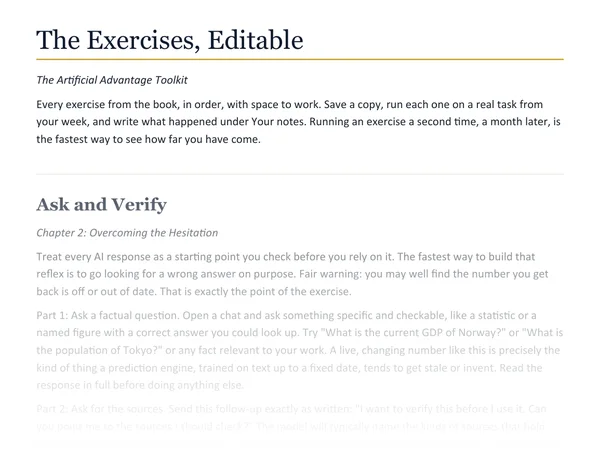
Read a skill on Monday and forgotten it by Friday?
Every exercise from the book, with space for your notes. You run each one on your own work and keep a record of what happened.
-
Word fileThe 30-Day Practice Plan
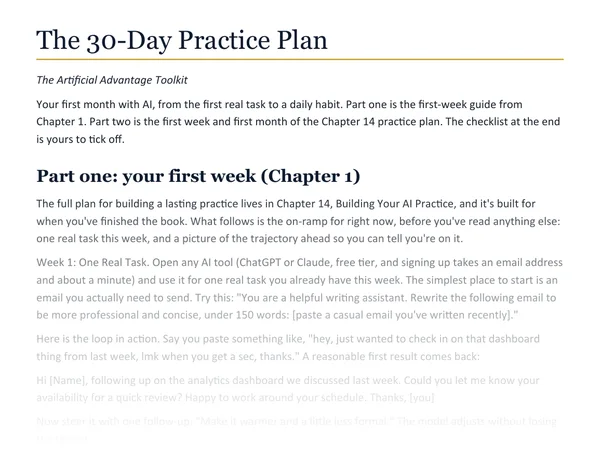
Tried AI once and drifted away?
A first month that starts with one real task and ends with AI in every working day, with a checklist to tick off.
-
Word fileThe 3-Month AI Practice Plan
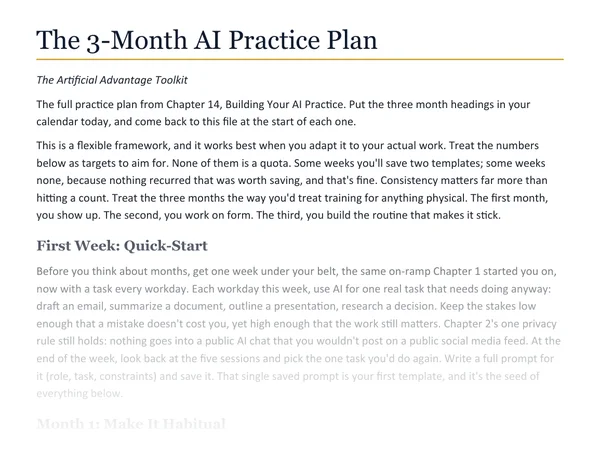
Using AI most days and not getting any faster?
Three months, each with its own job, and a check-in at the end of each one.
-
Word file and spreadsheetThe Professional Prompt Library
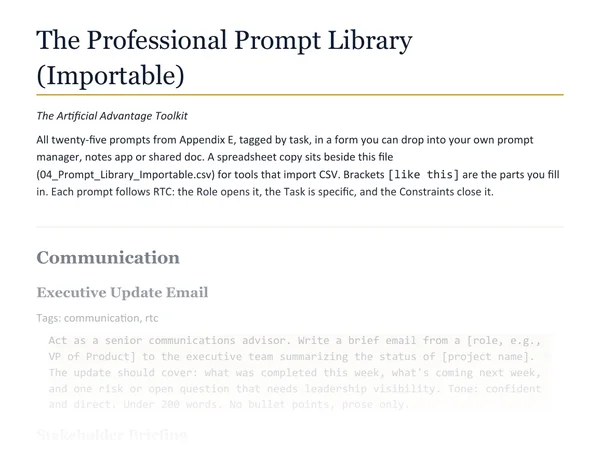
Staring at an empty chat box?
Start from a prompt that's already written, with blanks for your details. Five groups, from a meeting follow-up to a first draft from your notes. It also comes as a spreadsheet you can import.
-
Word fileThe Role Library
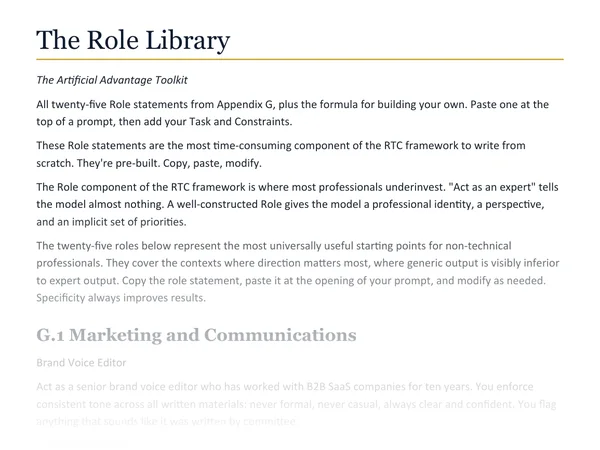
Typed "act as an expert" and got nothing better?
25 openers that give the AI a job title and a point of view, in eight work areas, plus the formula for writing your own.
-
Word fileThe Tool-Selection Cheat Sheet
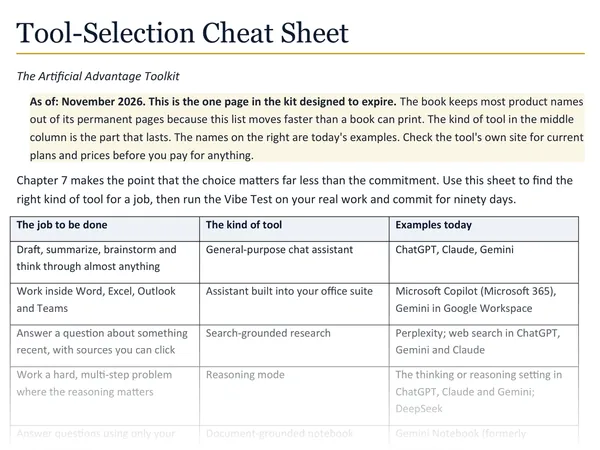
Not sure which AI app to open for the job in front of you?
Find your job in a list of twelve and see the kind of tool that fits.
It's in the Toolkit. The page carries a date, so check it before you rely on a product name.
-
Word fileThe Director's Cheat Sheet
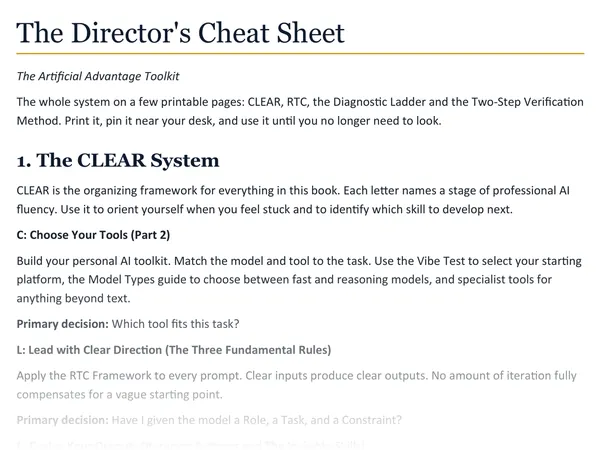
Halfway through a task and can't remember the next step?
The whole method on a few pages: the five steps, the three-part brief, how to trace a wrong answer to its cause, and the two-step check before your name goes on it.
It's in the Toolkit. Print it and keep it by your screen.
The Companion Library
The book's reference pages, online and kept current. It's free for everyone, and it's in your bundle so everything lives in one place.
Watch it work, 10 seconds
- Nine pages: Prompt Builder, Quick Reference Card, The Professional Prompt Library, The Role Library, Framework Reference, The Director's Diagnostic, AI Tools Reference, Glossary and Sources.
- The Prompt Builder assembles a brief from three answers.
- It opens on any screen, with no email and no login.
In the bundle, the Library keeps the book's reference pages one tap away.
In 1921, at the University of Toronto, Frederick Banting kept failing. Months of study and failed attempts, with Charles Best. In January 1922, their first patient was treated with insulin. The breakthrough came after the failures, here in Toronto.
Most of us try AI twice, get a generic answer, and stop. The people who get good at it learn why an answer went wrong. Brief AI the way you'd brief a new hire. Check what comes back. And when it's wrong, trace it to the cause, so you fix the request instead of starting over.
Pick one real task. The 7-Day AI Workbook, included in the bundle, runs it for seven days, starting with the old way on Day 2. Why would a workbook start you there?
The 7-Day AI Workbook
You understand the method. Have you tried it on your own work?
One real task of your own, one step a day for seven days.
- Day 1pick one task you do every week.
- Day 2do it the way you do it today, and save the result.
- Day 3write the three-part brief.
- Day 4ask for one thing at a time, and improve in rounds.
- Day 5trace what went wrong.
- Day 6check the answer before you trust it.
- Day 7run it again, and put the two results side by side.
- Day 2: you run the task the way you do today, and save it.
- Day 7: you run it with the full method, and compare.
That's why Day 2 comes first: on Day 7 you see the difference in your own work. - You keep the template.
-
The 7-Day AI Workbook, page 4
Day 1: The Director's Mindset
Today's skill: You direct, and the AI generates. Day 1 comes before the five CLEAR stages and sets the mindset that runs through all of them.
The Director's Mindset is a small pause before typing. Before you ask the AI for anything, you answer three questions: what do I need, who will use this, and what does good look like?
-
The 7-Day AI Workbook, page 16
Day 7: R, Repeat to Build a Practice
Today's skill: Template Thinking. Build it once, then reuse it.
Template Thinking fixes that. Engineer the prompt once, with full detail. Save it. Next time, paste the template, drop in the new details, give it a light edit and send.
Day 1 and Day 7.
In the bundle, the Workbook is where you try the method on your own work.
Everything AI 2026
Hundreds of AI tools, and no idea which one fits your job?
- Meetings, Notes and Productivity 23 resources
- Writing and Editing 17 resources
- Presentations, Design and Documents 22 resources
- 684 resources
Look up the job in front of you and see the resources that fit, with what each costs. One job, Meetings, Notes and Productivity:
- Fathom: free meeting recorder with summaries and highlights. Beginner, freemium.
- Fireflies: joins calls to record, transcribe and summarise. Beginner, freemium.
- Clockwise: team calendar optimiser. Beginner, freemium.
That job lists 23 resources. The guide has 12 job stacks, a spreadsheet and a 23-page field guide, and it's a dated snapshot.
In the bundle, Everything AI 2026 shows which resources fit the job in front of you.
At sixty-five, Harland Sanders was living on a government cheque of a hundred and five dollars a month. What he had was a chicken recipe, built from years of cooking.
You have a recipe too. Years of knowing your clients, your numbers, and how your work gets done. Then you type one line into an AI chat, and none of that goes in. So the answer comes back generic, and you decide AI isn't for you.
The fix is telling AI what you already know. Who it's for, why it matters, and what a good result looks like.
Your recipe goes in once: the About Me file and the voice file from The 12 Commandments, in the bundle.
The 12 Commandments to Make AI Obey
Does AI forget who you are every time you open a new chat?
Twelve habits for getting the answer you meant. This guide is written for the free and basic plans of ChatGPT, Claude, Gemini and Grok.
- One chat that's doing three jobs.
- Asking for a finished piece when you needed a plan.
- An answer built on a guess about what you wanted.
- A draft that's finished and still isn't right.
- Advice about a document the AI never saw.
- Ten messages to get what one could have asked for.
- Retyping who you are in every chat.
- Drafts that sound like a stranger wrote them.
- Uploading the same files to every new chat.
- Slow answers on easy jobs and thin answers on hard ones.
- A chat that keeps making the same mistake.
- A wrong fact going out under your name.
- 22 pages.
- Two starter files you fill in once: an About Me file, so you stop re-typing who you are, and a voice file, so the drafts sound like you.
- A one-page card to keep by your screen.
-
The 12 Commandments to Make AI Obey, page 10
Before and after (everyday). Ben wants to scale a recipe.
Before: "How do I make my lasagne for eight people?"
After: "Here's my lasagne recipe, which serves four. Rewrite it for eight people, keep the same layout, and tell me if the baking dish or the cooking time needs to change. START RECIPE [paste it] END RECIPE"
-
The 12 Commandments to Make AI Obey, page 20
Part 5: The one-page card
SET UP ONCE
- Write your About Me file once.
- Keep a voice file.
- Give your files a home. A project, then point back.
Last 10 seconds before you hit send: Is this one job? Did I say plan, make or check? Did I say who it's for and how long? Did I paste the real thing?
-
The 12 Commandments to Make AI Obey, page 19
Starter file 2: Voice
MY VOICE
HOW I SOUND
- My sentences are usually: [short / mixed / long]
- I open by: [getting straight to the point / a friendly line / a question]
- I close by: [a clear next step / a thank-you / a short sign-off]
- I use contractions: [yes / no]
- Words and phrases I like: [list]
- Words and phrases I never use: [list]
A habit on its page, the card, and the voice file.
In the bundle, The 12 Commandments helps the drafts sound like you.
Your download list, and the one place to start
Right after you pay, every piece is on one download page, and one receipt email lists everything with a link back to your library. Start with the 7-Day AI Workbook. On Day 1 you pick a task you do every week.
See the download page
Sample order

Everything you've read about above arrives in that one download.
Check each price before you buy
See each price
Prices are in US dollars, plus sales tax where it applies.
Get the bundle for $2730-day money-back guarantee. If it is not for you, email elvin@elvinpeters.com within 30 days of purchase and I will refund you in full.
Straight answers before you buy
Is it safe to paste client or work information into AI?
The book's rule: never paste anything into a public AI chat that you wouldn't post on a public social media feed. Chapter 2 lists what to keep out: personal identifiers, confidential business information such as client lists and anything under NDA, and privileged advice from doctors, lawyers or accountants.
I'm not technical. Is this for me?
Yes, it's meant for beginners. It was written for professionals who tried AI and shrugged, and for people whose company just told them to use it.
I tried ChatGPT and it was useless. Why would this be different with the same free tool?
Because the request changes, and the tool stays the same. A one-line request gets a generic answer from any AI. The book teaches you to explain the job: who it's for, why it matters, and what done looks like. Both answers at the top of this page came from the same AI.
How long before I see a better answer?
The three-part brief is in Chapter 3, and you can try it on your next request. The Workbook gives you a before and an after on your own task by Day 7.
Do I need a paid AI plan?
No. The book's skills work across ChatGPT, Claude, Gemini and Copilot, and a free plan is enough to start.
Will it work for my kind of work?
The Toolkit's 25 prompts come in five groups: Communication, Analysis and Research, Writing and Editing, Planning and Strategy, and Learning and Development. A few by name: Executive Update Email, Meeting Follow-Up, Risk Assessment, First Draft from Notes and Plain Language Rewrite.
How do I stop it making things up?
You check before you use it. The book teaches a two-step check for reading an answer before your name goes on it, and a way to trace a wrong answer back to its cause. The tax email above shows why: the better answer still added a claim nobody gave it.
What arrives, and where?
An instant download plus an email. One receipt email lists everything and links to your library, where each piece has its own download. The Companion Library opens online.
Is this just a pile of files?
There's one place to start: the 7-Day AI Workbook. It points you to the chapter to read each day, and the other files come in when you need them.
What format are the files?
The ebook is an EPUB file. The 7-Day AI Workbook and The 12 Commandments are PDFs. Everything AI 2026 comes as one zip with a PDF field guide and an Excel workbook. The Toolkit is a zip of 17 files: Word documents, a spreadsheet and a short start-here file. Every file downloads to your device.
What does it cost in all?
$27, paid once, plus sales tax where it applies. Prices are in US dollars.
Is the refund just one email?
Yes. Email elvin@elvinpeters.com within 30 days of purchase and I will refund you in full. You keep the files.
Why not just buy the paperback?
You can. The paperback and hardcover are on Amazon. The bundle adds the Toolkit, the 7-Day AI Workbook, Everything AI 2026 and The 12 Commandments, which each sell on their own.
Can my team use it?
The licence covers personal and internal work use. Please don't resell or share the files.
Here is everything you get for $27
Click the button, and the ebook, the Toolkit, the 7-Day AI Workbook, Everything AI 2026, The 12 Commandments to Make AI Obey and the Companion Library are yours.
Elvin Peters
P.S. Pick one real task from this week, open the book, and try the method on it.
Optional add-on, sold separately:
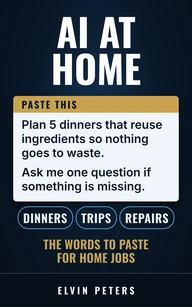
Bills, dinners, car warning lights and trips, all with ready words.
One job from the guide, in full.
The internet bill, start here if money is the goal
The problem: The bill went up after a discount ended. In this example the internet is $95 a month, you have been a customer for 6 years, the promo ended 2 months ago, you are not in a contract, and you saw a competitor ad for $60 at the same speed. Those amounts are made up. Change the numbers in the brackets to your own bill before you send.
Paste this
Help me call about this bill. Act as a customer retention agent at a phone or internet company.
My internet bill is [$95] a month. I have been a customer for [6 years]. A promo ended [2 months] ago. I am not in a contract. I saw a competitor ad for [$60] a month at the same speed.
Ask me one question if something is missing. Then give me the call plan: who to ask for, the first sentence I say, what I ask for, and the lowest monthly price I will accept. Then play the company for one round so I can practise.
A good answer looks like this: It asks one short question if a contract or a bundle is unclear. Then it names who to ask for, gives you the first sentence, sets the lowest price you will accept, and tells you to get the new price in writing before you hang up. It warns you not to take a new fixed term until you know the price after that term ends.
Your next click: Call the company. Ask for retention, or for loyalty. Read the first sentence from the answer. Write down the new monthly price and the confirmation number before you hang up. If they push a new contract, ask what the price becomes when it ends, and decide after you hear that number.
You did it when the confirmation number is on a piece of paper or in an email from them, and you know the price on the next bill. The company can still say no, and you have still made the call.
-
AI at Home, page 4
Paste this
Plan 5 dinners that reuse ingredients so nothing goes to waste.
Who is eating: [people]. Allergies and foods to skip: [list, or "none"].
Minutes on a weeknight: [number]. Equipment I will use: [pots or machines].
Budget: [amount].
I am attaching one photo of each fridge shelf, taken standing back with the door
open.
Give me one shopping list grouped by store aisle, and a prep list I can finish in 30
minutes on Sunday.
Ask me one question if something is missing.
Inside: Dinners for the week. Tap to see the whole page.
Who it helps
Parents and kids: a tutor that quizzes your child one question at a time and explains the step so you can teach it, without writing their answers. One dated list from the pile of school and activity emails. A trivia night or a short mystery to host.
Helping an older parent, or yourself: better questions to take to the pharmacist, paperwork in plain words, and what changed in this year’s insurance renewal.
Around the house: what to say when you call about the furnace or a breaker, what to ask about a contractor quote, and whether to repair or replace an appliance.
Money: a call plan for the internet bill, and the month that spiked in a year of utility bills.
Ten long jobs:
- Dinners for the week
- The internet bill
- A device that stopped working on Windows
- The check engine light, before you call the shop
- A recipe, fixed for your table
- A trip that fits everyone
- The part you cannot name
- An old computer
- A slow leak in a tire
- The plant doctor
Shorter jobs:
- A film you half remember
- A year of utility bills
- Repair or replace an appliance
- A news briefing you can check
- A tutor that quizzes you
- A sheet you can build yourself
- School and activity emails
- A brain dump
- Read the bad reviews first
- Gifts, a party, or a night out
- Trivia or a short mystery
- Three colour ideas for a room
- The story behind something on a walk
- An insurance renewal
- A contractor quote
- Paperwork in plain words
- Questions for a pharmacist
- The furnace or a breaker, before you call
I tried the ten long jobs in Claude with made-up situations. Other apps were not tested for this guide. The shorter jobs use the same method and were not each tried.
Every job ends with something you check yourself, because the AI can be wrong.
I still call a person if I see cords in a tire, smell gas, or smell burning.
This is not medical, legal, financial, or safety advice, and nothing here is guaranteed.
A 19-page PDF, $7 in US dollars. Instant download plus an email, covered by the same 30-day money-back guarantee.
30-day money-back guarantee. Prices are in US dollars, plus sales tax where it applies.
As an Amazon Associate I earn from qualifying purchases.
The Artificial Advantage and the files that come with it are based on the author's own experience. Your results depend on your work and on how you use what you learn, and they will differ from his. Nothing on this page or in these products is legal, financial, medical or other professional advice. The example answers on this page were written by AI to show the difference. The 30-day money-back guarantee applies to every purchase.